Saturday, 23 November 2013

A Free Screen Capture Tool Loaded with Features

ShareX is a free and open source screen capturing tool for Windows so loaded with features that it may give even commercial screen capture programs a run for their money. The tool is portable too so you can run it on your USB drive without installation.


ShareX has all the necessary features that would expect in a screen capturing tool. It lets you capture fixed areas on the screen, full application windows or even freehand regions. There’s a built-in editor to help you annotate screenshot images. You can create watermarks and they are auto-added to the image after the screen capture is complete.

You can configure the app to auto-upload your screen captures to cloud destination like Google Drive, Dropbox, Picasa, Box, Flickr, Imgur and many more. When the image is uploaded, the shared URL is copied to the clipboard for quick sharing on social networks.

There’s a useful timer mode that will auto-capture screenshots of the selected region on your desktop after ‘n’ seconds and will then upload them to your favorite destination.
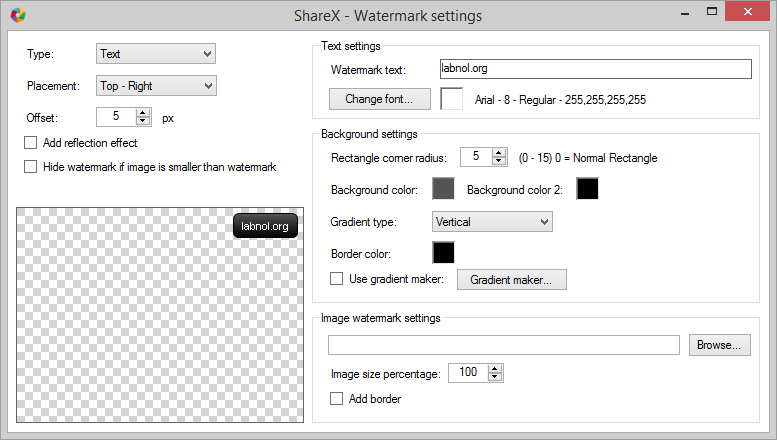

The tool can automatically watermark your screenshot images before uploading

ShareX also includes a screen recorder and the screencasts can be either saved as video (MP4) files or as animated GIFs. You can modify the default capture frame rate (FPS) to achieve a balance between the video quality and the video file size.

Alternatives include Greenshot, Bug Shooting, PicPick and Skitch.

Monday, 18 November 2013

Download Youtube Videos Online


Watching Video is everyone's favorite pass time on the Internet.Everyone use a favorite place to watch videos,Youtube ,Megavideo,Metacafe video etc etc.Though Youtube is the top favorite among all of them.Watching video on the respective site may be a problem if you suffering from a slow Internet connection.

Wouldn't it be great to first download the video and then watch it like you would a full movie without interruption?
This sites doesn't have a built-in download feature but that doesn't matter,because we have accummulated some other ways to download videos from Youtube.

  • Here are some site that you can use to download Youtube videos online :
  1. keepvid.com
  2. Catchvideo.ne\
  3. Savevid.com
  4. Clipconverter.cc
  5. Savemedia.com
  • Here is another smartest way to do so :
  1. Go to Youtube.
  2. Search and find the video you want to download.
  3. Click on it.
  4. Click on the address bar of your browser.
  5. Replace "http://www."  or "http://m."(If you are from mobile) with "ss" and press enter key.
  6. Now a screen will appear with download links.
  7. Choose your video format there and start downloading.

track unknown callers by Truecaller


As you all know there are lots of services in the web world that you can use to trace unknown mobile numbers.But those are not very effective as you could get only few details like the state which mobile number belongs to and its telecom oparetor.

But today we are living in advanced twenty first century where everything is possible like we got an app which can help you to find more details (like owner/area etc) about those unknown callers.its called Truecaller.

  • How does Truecaller works?
Truecaller is a global dynamic directory for mobile phones.It was the phone directory of users.to build the database of mobile numbers,and any user can do number look up using it.

  • Trucaller Feature :
  1. Number lookup : you can lookup[ numbers by just entering the numbers in the search option of Truecaller app.
  2. Name lookup : using the number lookup feature you can find the contact details of any person by name.
  3. Call Filter : This feature allow you to add unwanted numbers to block/spam list.And Truecaller will notify you when the number try to get in touch.
  • Truecaller download links : 
  1. For Android : Download
  2. For Nokia : Download
  • You can also try it online by going here : Truecaller